PocketBase Manager
A control plane for provisioning and operating independent PocketBase instances. Formics built the administrator dashboard, hosting workflows, public product site, and a browser-local demo.
About Project
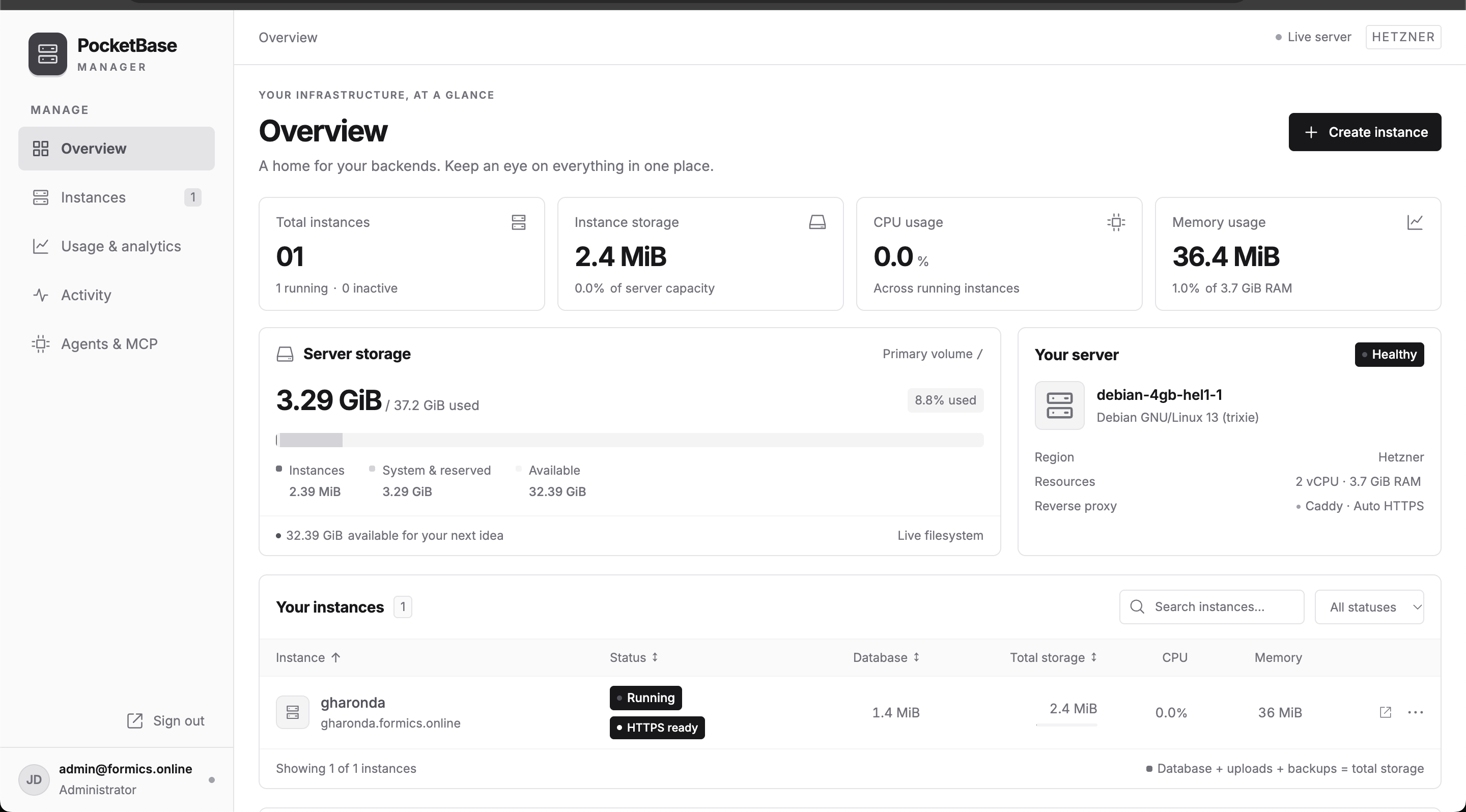
PocketBase Manager gives developers a clearer way to operate PocketBase hosting. An administrator can provision instances, start or stop services, inspect logs, and monitor storage, CPU, memory, and traffic from one interface.
Instance setup coordinates Linux accounts, bounded storage, service configuration, and HTTPS routing. Custom domain workflows make ownership checks, DNS progress, certificate status, and retry errors visible, rather than treating a running service as a finished public deployment.
The product also supports publishing static websites alongside PocketBase and scoped MCP access for agent workflows. The public website explains the hosting offer, while a separate interactive demo uses sample data stored in the visitor’s browser. The demo does not provision real hosting; the operational dashboard requires administrator access.
The dashboard image shown here is the project’s existing public product screenshot.
Challenges & Solutions
Key problems we identified and how we solved them through design and development.
Creating an instance involves several dependent infrastructure steps.
Solution
A persistent background provisioning workflow coordinates the Linux account, bounded storage, systemd service, and Caddy route. The interface shows progress and errors so administrators can see what still needs attention.
A running backend does not necessarily have a working public domain.
Solution
Separate service status from domain readiness. Domain workflows track ownership verification, DNS, proxy configuration, and certificate progress, with trusted TLS checks before reporting HTTPS ready.
Administrators need resource visibility and control across independent backends.
Solution
Bring instance controls, service logs, configurable RAM limits, and storage, CPU, memory, and traffic information into a shared dashboard. Keep each instance’s service and storage boundaries explicit.
Visitors should be able to explore the dashboard without accessing production infrastructure.
Solution
Publish a separate browser-local demo with sample instances and simulated operations. The public demo explains the experience while the live management APIs remain authenticated.
The technology behind the product.
The tools used to build the interface, connect the data, and run the application.
 Astro
Astro- Frontend framework
Builds the dashboard interface and supports the public product and demo experience.
- TypeScript
- Dashboard interactions
Typed views, HTTP service integration, and a separate browser-local demo service for sample operations.
- Go
- Control plane and agent
Implements management APIs, background operations, and a restricted platform agent for validated instance operations.
 PocketBase
- Application data and authentication
Stores manager records, administrator authentication, instance state, usage samples, and agent tasks, alongside the independently hosted PocketBase instances.
- Caddy
- Domains and HTTPS
Routes instance and customer domains and handles HTTPS, with domain and certificate progress surfaced in the dashboard.
- Linux & systemd
- Instance operations
Dedicated Linux accounts, bounded storage volumes, service lifecycle controls, and per-instance resource limits.
- Model Context Protocol
- Agent integration
Scoped tokens connect agent tools to assigned instances and persistent tasks, with revocation and recorded actions.
- GitHub Pages
- Public site and demo hosting
Publishes the product landing page and browser-local interactive dashboard demo separately from the private control plane.
Have an Idea?
Let's Make It Happen
We help startups and enterprises build scalable web applications, mobile apps, SaaS platforms and AI-powered products.